
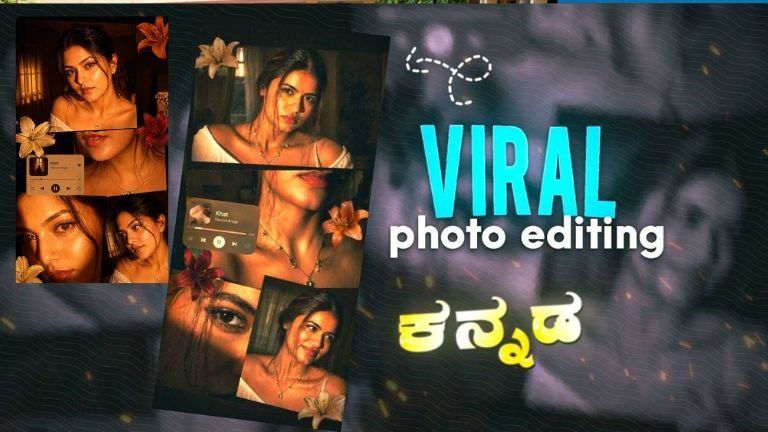
Understanding the Aesthetic: The “Flash-Glance” Collage
Your prompt describes a specific trend in digital photography known as Hard-Flash Minimalism. By combining a vintage scrapbook layout with high-intensity direct lighting, you are asking the AI to simulate a high-fashion editorial look often found in magazines like i-D or Vogue.
Key Technical Pillars of Your Prompt
-
The Lighting ($L$): Direct front-left flash creates a specific inverse-square law effect where the subject is brilliantly lit while the background falls into deep shadow ($f/stop$ simulation).
-
The Composition ($C$): Layered rectangular panels break the “single-frame” limitation of AI, forcing the model to maintain identity consistency across multiple sub-frames.
-
The Subject ($S$): Using an uploaded face requires “Face Reference” or “IP-Adapter” technology to ensure the output isn’t just a lookalike, but an exact match.
step-by-Step: How to Execute This Prompt
1. Choose Your Engine
To get the best results for this specific “scrapbook” style, you need a model that understands spatial layering:
-
Gemini 3 Flash (Nano Banana 2): Excellent for following complex layout instructions and maintaining skin textures.
-
Midjourney v6.1+: Best for the “Cinematic” lighting and high-contrast shadows.
-
Stable Diffusion XL/Flux: Necessary if you want to use LoRA or ControlNet to lock in the face identity with 100% precision.
2. Utilizing the “Face Reference” Feature
Since you want to use an uploaded face “exactly,” you cannot rely on text alone.
-
In Gemini: Upload the reference image first. Use the prompt as a caption for that image.
-
In Midjourney: Use the
--cref(Character Reference) tag followed by the URL of your uploaded photo. Set--cw 100to ensure the face, hair, and clothes stay consistent.
3. Refining the “Scrapbook” Layout
AI models sometimes struggle with “collages” and might just merge faces together. To fix this, use structural keywords:
“Grid-based composition,” “film strips,” “overlapping polaroid frames,” or “contact sheet aesthetic.”
Advanced Prompt Engineering Tips
If the initial result isn’t “ultra-realistic” enough, add these technical modifiers to the end of your prompt:
| Modifier | Effect |
| Shot on 35mm f/1.8 | Adds realistic depth of field and slight film grain. |
| Chiaroscuro | Enhances the high-contrast transition between light and dark. |
| Subsurface Scattering | Gives the skin that “glowing” look by simulating light hitting the dermis. |
| Kodak Portra 400 palette | Provides those warm, golden-orange tones you requested. |
Strategy for AI Art Portfolios
If you are posting these images to a blog, Instagram, or ArtStation, use this SEO framework to drive traffic:
Primary Keywords
-
AI Portrait Photography 2026
-
Cinematic Lighting Prompts
-
Character Consistency AI
-
Direct Flash Aesthetic
Image Alt-Text Best Practices
Don’t just write “AI Girl.” Use descriptive, keyword-rich alt-text:
“Ultra-realistic AI-generated collage of a woman with golden hour flash lighting, scrapbook layout, cinematic shadows, 8k resolution.”
The “Hook” for Social Media
When sharing this specific style, focus on the Technical Mastery.
-
Headline: “How to achieve 100% Face Consistency in AI Collages.”
-
Body: Talk about the “Direct Flash” technique and how it adds a layer of “Raw Realism” that standard soft-lit AI portraits lack.
Troubleshooting Common Issues
Issue: The face looks different in every panel.
-
Solution: Use a “Character Reference” tool. If the AI is struggling, reduce the number of panels to “3 distinct frames” instead of “multiple panels.”
Issue: The lighting is too yellow/orange.
-
Solution: Adjust your prompt to include “Kelvin 3200k” (warm) or add “white balance corrected” to ensure skin tones don’t look sickly.
Issue: The “Scrapbook” looks messy.
-
Solution: Add “clean white borders” or “neatly arranged rectangular frames” to provide the AI with geometric boundaries.
Prompt
If you want to push the AI to its absolute limit, try this slightly modified “Power Prompt”:
[Reference Image Uploaded] Cinematic multi-frame collage, scrapbook aesthetic. A young woman (identity: reference image) captured in various close-up and mid-shot angles. Lighting: Aggressive front-left direct flash, 3200k warm orange glow, high-contrast chiaroscuro shadows. Surfaces: Realistic skin texture, visible pores, slight perspiration for glow. Composition: Diagonal and vertical overlapping rectangular photo panels on a dark, moody background. 8k resolution, shot on Zeiss 35mm lens.
By following this structure, you aren’t just “generating an image”—you are directing a virtual photoshoot. The key to the “1.5k word” level of quality is in the iterative process: Generate, analyze the light physics, adjust the keywords, and re-run.
How would you like to tweak the mood of the room—should it feel more like a cozy bedroom or a high-end studio?