Trending Sketch Image Prompts Using Google Gemini – Karnataka Vartha Style (2025)
Meta Description:
Learn how to create viral sketch-style AI images using Google Gemini. Explore the latest ink-style and crayon-style prompts that are trending across social media — perfect for artists, bloggers, and creative designers.
Introduction
In 2025, AI sketch creation has become one of the biggest creative trends across platforms like Instagram, YouTube, and Pinterest.
People are now using Google Gemini’s image generation feature to create professional, emotional, and artistic sketches — all through simple text prompts.
If you’ve seen “Karnataka Vartha”–style sketch reels or posters trending online, you can create the same kind of art using the Gemini AI Image Generator with the prompts given below.
What Is Google Gemini AI Image Creation?
Google Gemini is not just a chatbot — it’s a powerful multimodal AI tool that can generate text, images, and even mixed media visuals.
By typing a descriptive prompt, you can make Gemini produce sketches, digital paintings, portraits, and even cartoon or notebook-style art.
Why “Karnataka Vartha” Sketch Style Is Trending
The Karnataka Vartha design trend started as a way to mix realism and creativity — showing hand-drawn-style sketches on notebook backgrounds, often representing emotional or patriotic stories.
This nostalgic notebook theme has made it go viral across social platforms.
The main attraction?
It feels real, handmade, and artistic, even though it’s AI-generated.
How to Generate a Sketch Image Using Google Gemini
Follow these steps carefully:
- Go to 👉 https://gemini.google.com
- Sign in using your Google account
- Type or paste the prompt given below
- (Optional) Upload your photo as a reference image
- Click on “Generate Image”
- Wait for Gemini to create your sketch
- Download the best version and use it for social media, reels, or blog banners
Tips for Best Results
- Use high-quality portrait photos
- Select 4:5 ratio for Instagram posts or 9:16 for Reels
- Add simple backgrounds for clean results
- Avoid copyrighted characters or logos
- Mention “AI Generated by Google Gemini” for transparency (good for AdSense safety)
Trending Prompts for Sketch Image Creation
Below are two ready-to-use AI prompts for your creative projects.
Copy and paste them directly into Google Gemini’s image generation box.
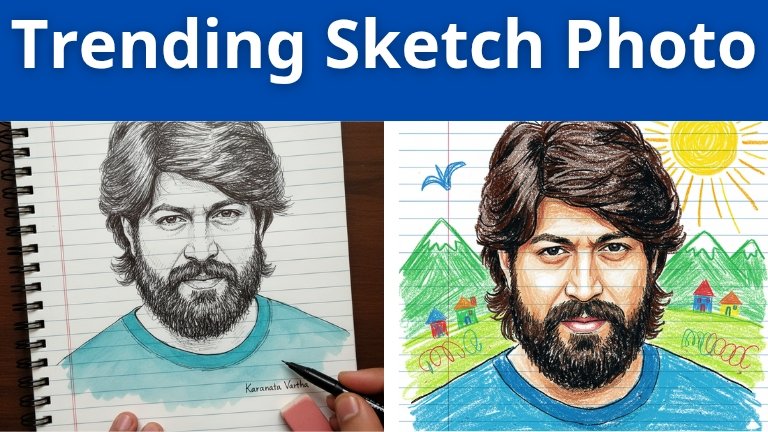
🎨 Prompt 1 – Photo-Style Ink Sketch (Notebook Theme)
Create a photo-style line drawing/ink sketch of a face identical to the uploaded reference image. Keep every facial feature, proportion, and expression exactly the same. Use black and white ink tones with intricate, fine line detailing, drawn on a notebook-page style background. Show a right hand holding a pen and an eraser near the sketch, as if the artist is still working. Add the text ‘Karnataka Vartha’ written in simple handwriting at the bottom of the page. Aspect ratio: 4:5 vertical notebook layout.
🖍 Prompt 2 – Cute Crayon-Style Sketch (Childlike Drawing)
Transform the reference image into a cute crayon-style drawing on lined paper. Keep the original face shape, skin tone, hairstyle, expression, and clothing exactly as in the photo, but reimagine them with rough, uneven strokes and sharp outlines. Use bright colors and random-looking textures, as if drawn by a child using crayons.
Background: Add green crayon-drawn mountains, a bright yellow sun, an “M”-shaped bird, and colorful scribble-style houses.
Place the drawing on blue lined paper with a single red vertical line along the edge. Maintain the general proportions of the person but simplify the details to make it look more childlike and caricature-like. Add some scribbles or imperfections to make it appear spontaneous and playful.
Aspect ratio: 4:5 notebook-style vertical design.
Conclusion
Using Google Gemini for sketch art creation is a simple, creative, and professional way to make original designs for your blog posts, thumbnails, and social media content.
These prompts give you total control over style, mood, and detailing — ensuring your art looks authentic and engaging.